Plug In Mechanical Timer - Daily 15 Minutes
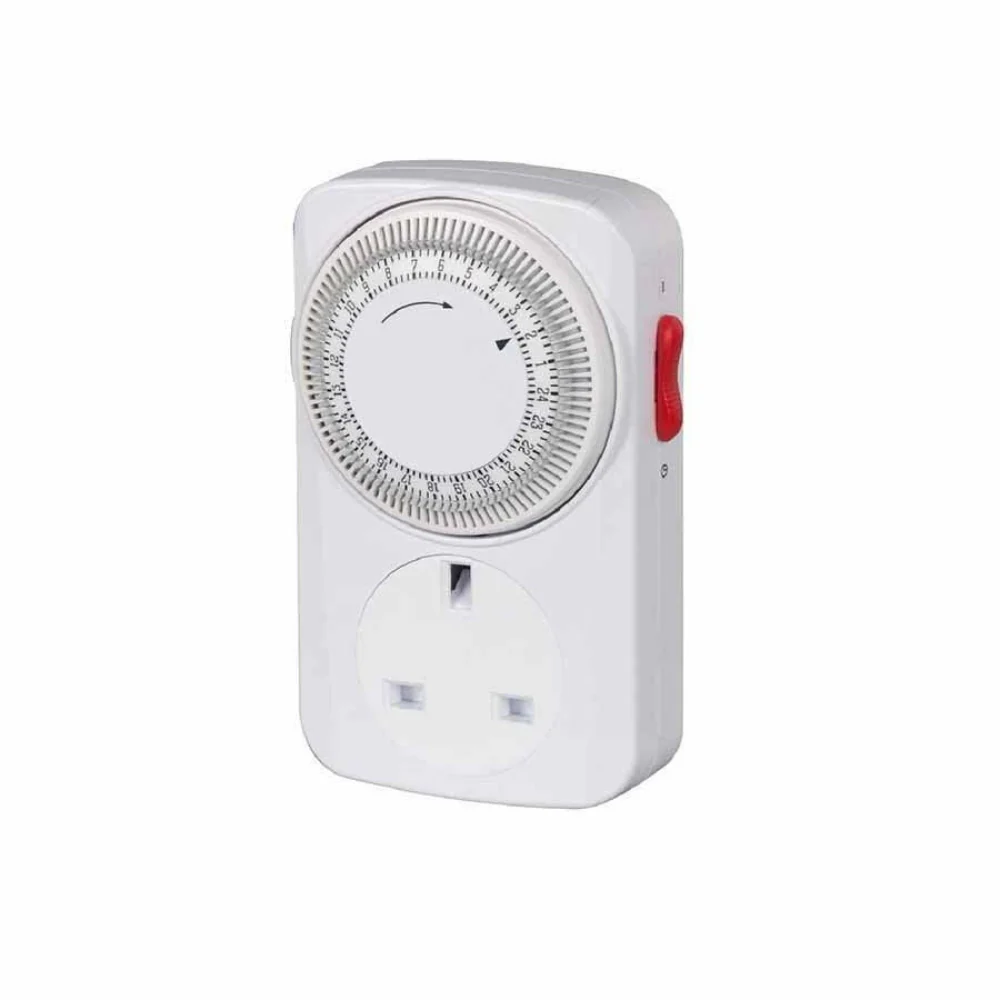
A plug-in mechanical timer is a convenient and energy-saving device that allows you to set specific times for your electrical devices to turn on and off. This type of timer is perfect for controlling lighting, heaters, fans, and other electronics in your home. To use a plug-in mechanical timer for daily 15-minute intervals, follow these steps: 1. Plug the timer into an electrical outlet. 2. Set the current time by turning the dial on the timer to match the current time. 3. On the dial, locate the fifteen-minute increment markings. These are usually marked with numbers or lines that indicate 15-minute intervals. 4. To set the timer to turn on for 15 minutes each day, turn the dial to the desired time that you want the device to turn on. For example, if you want the device to turn on at 6:00 PM and run for 15 minutes, set the dial to 6:00 PM. 5. Turn the dial to the "Off" position after the desired 15-minute time frame has passed. 6. Repeat this process for each day that you want the device to turn on for 15 minutes. Keep in mind that plug-in mechanical timers do not have the capability to adjust for daylight saving time, so you may need to manually adjust the timer twice a year. Make sure to follow the manufacturer's instructions and safety precautions when using the timer.
A plug-in mechanical timer is a convenient and energy-saving device that allows you to set specific times for your electrical devices to turn on and off. This type of timer is perfect for controlling lighting, heaters, fans, and other electronics in your home. To use a plug-in mechanical timer for daily 15-minute intervals, follow these steps: 1. Plug the timer into an electrical outlet. 2. Set the current time by turning the dial on the timer to match the current time. 3. On the dial, locate the fifteen-minute increment markings. These are usually marked with numbers or lines that indicate 15-minute intervals. 4. To set the timer to turn on for 15 minutes each day, turn the dial to the desired time that you want the device to turn on. For example, if you want the device to turn on at 6:00 PM and run for 15 minutes, set the dial to 6:00 PM. 5. Turn the dial to the "Off" position after the desired 15-minute time frame has passed. 6. Repeat this process for each day that you want the device to turn on for 15 minutes. Keep in mind that plug-in mechanical timers do not have the capability to adjust for daylight saving time, so you may need to manually adjust the timer twice a year. Make sure to follow the manufacturer's instructions and safety precautions when using the timer.
Description
A plug-in mechanical timer is a convenient and energy-saving device that allows you to set specific times for your electrical devices to turn on and off. This type of timer is perfect for controlling lighting, heaters, fans, and other electronics in your home. To use a plug-in mechanical timer for daily 15-minute intervals, follow these steps: 1. Plug the timer into an electrical outlet. 2. Set the current time by turning the dial on the timer to match the current time. 3. On the dial, locate the fifteen-minute increment markings. These are usually marked with numbers or lines that indicate 15-minute intervals. 4. To set the timer to turn on for 15 minutes each day, turn the dial to the desired time that you want the device to turn on. For example, if you want the device to turn on at 6:00 PM and run for 15 minutes, set the dial to 6:00 PM. 5. Turn the dial to the "Off" position after the desired 15-minute time frame has passed. 6. Repeat this process for each day that you want the device to turn on for 15 minutes. Keep in mind that plug-in mechanical timers do not have the capability to adjust for daylight saving time, so you may need to manually adjust the timer twice a year. Make sure to follow the manufacturer's instructions and safety precautions when using the timer.